On this page
Have you ever clicked a link on Twitter because the preview looked trustworthy?
If so, you’re not alone—and that’s exactly what this experiment explores.
The Premise
Twitter (and most social platforms) automatically generate link previews—also known as unfurling. These previews typically include:
- A title
- A description
- An image
- A domain
Because of this, users often assume:
“If the preview looks legitimate, the link must be safe.”
That assumption is where the problem begins.
The Experiment
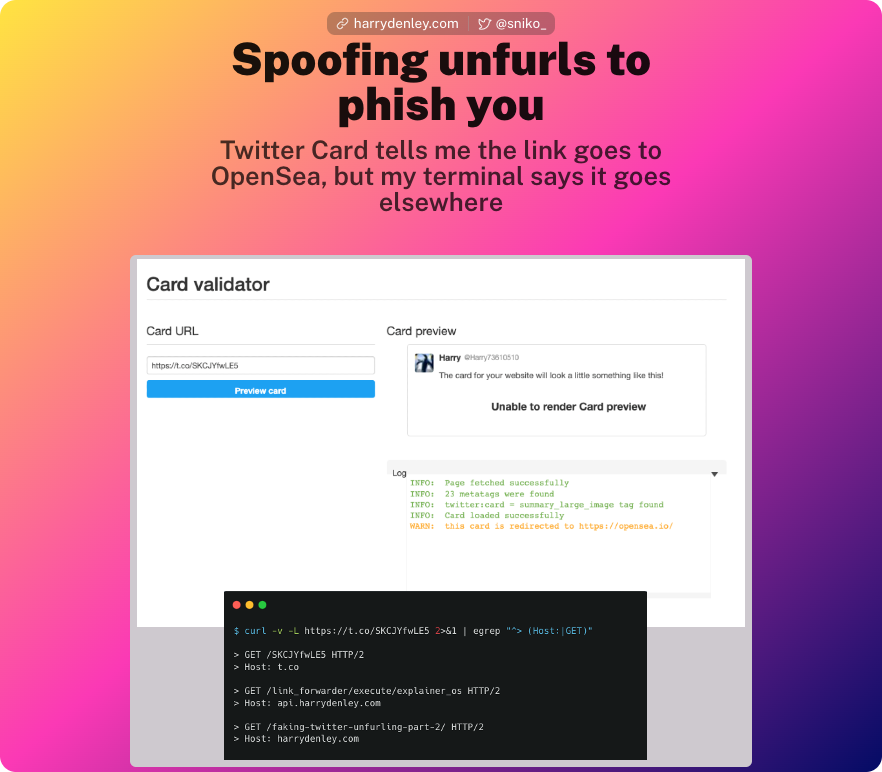
This experiment targets a specific audience—crypto Twitter—to measure how often users click links based purely on perceived trust.
It builds on a previous experiment (Part 1) and aims to answer a simple question:
How many people will click a link because a trusted source appears to endorse it?
What Happened?
If you arrived here expecting a different destination…
That’s the point.
The tweet you clicked suggested one thing—but delivered another.
No malware. No exploit. Just misplaced trust.
Why This Works
This technique relies on social engineering, not technical exploitation.
It takes advantage of:
1. Trust in the Source
If a well-known account shares a link, users are more likely to trust it—often without verifying the destination.
2. Trust in the Preview
People rely heavily on visual cues:
- Recognizable branding
- Familiar wording
- Clean formatting
3. Lack of Verification
Most users:
- Don’t hover over links (or can’t, on mobile)
- Don’t inspect URLs carefully
- Assume platforms validate content
The Core Issue
A link preview is not a guarantee of where a link will take you.
Previews can be:
- Misleading
- Outdated
- Manipulated
- Completely unrelated to the final destination
And once trust is established, users rarely question it.
Lessons Learned
This experiment highlights a simple but important takeaway:
🔒 Don’t outsource trust to the UI
Just because something looks legitimate doesn’t mean it is.
Before clicking:
- Check the actual URL (not just the preview)
- Be cautious of urgency or hype (especially in crypto spaces)
- Treat all links—even from trusted accounts—with skepticism
Final Thoughts
This wasn’t about tricking users—it was about demonstrating how easy it is to be misled.
Modern platforms are designed for convenience and engagement, not security. As a result, subtle trust signals—like link previews—can be exploited with minimal effort.
If a preview can influence your decision to click, it can also be used against you.
Stay curious. Stay skeptical.